
Your long raw videos, turned into social-media shorts. Automatically.
Trainers, politicians, podcasters: you record what you say. SpeechRise turns those hours into polished shorts, publishes them and manages the comments, automatically. You step in where your judgement matters, never for the technical chores. That is how a voice becomes a name.


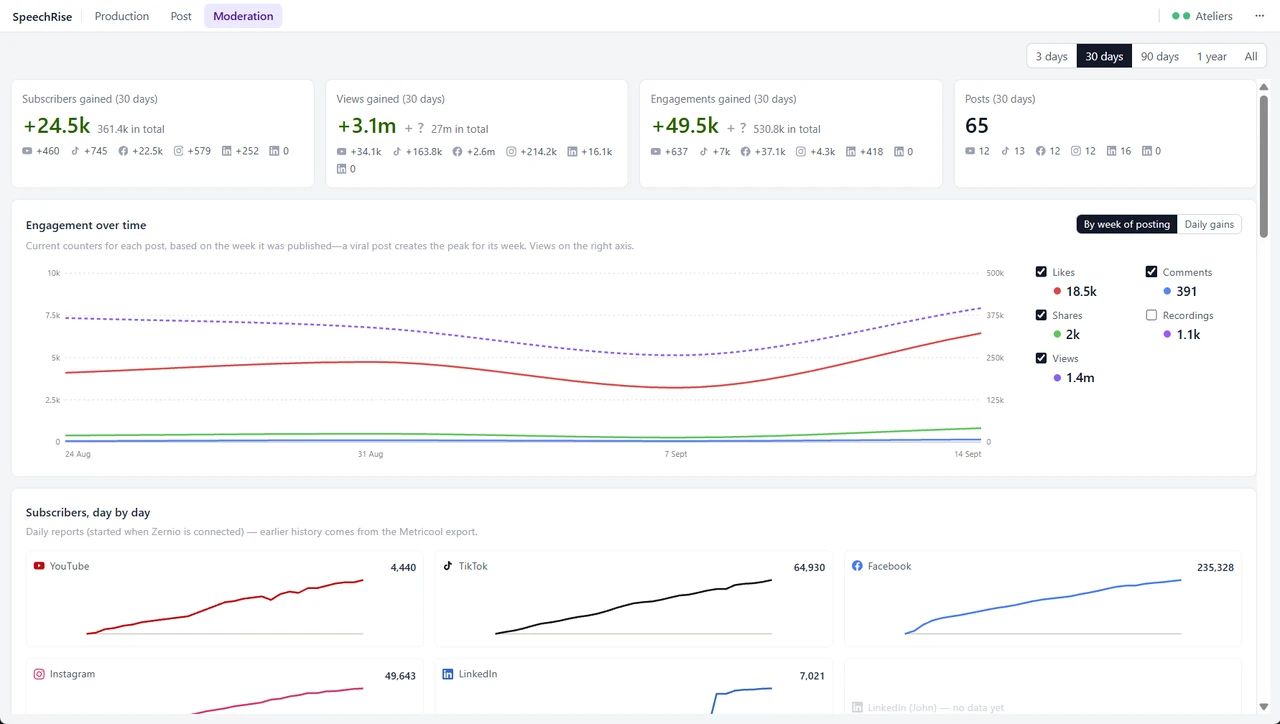
From 0 to 3 million views a month
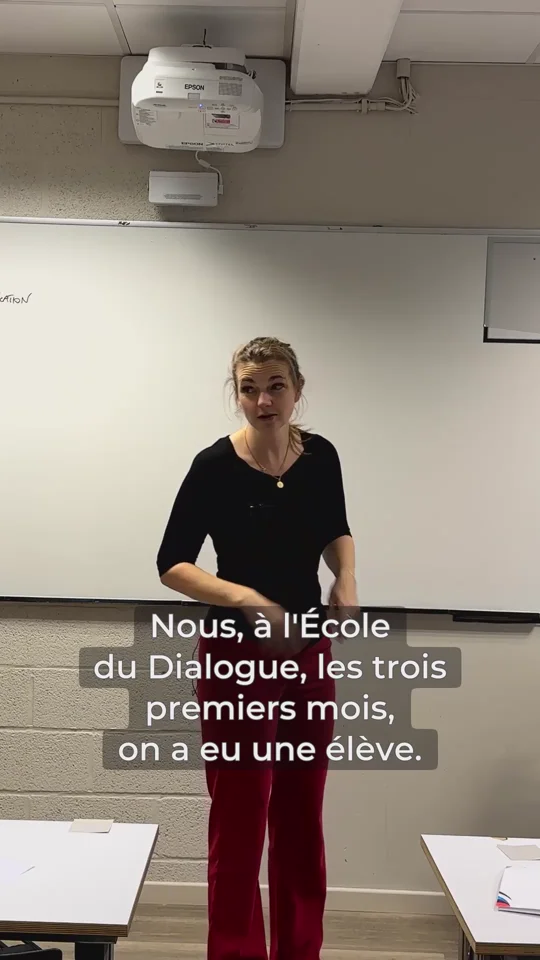
School'Up trains 5,000 teachers a year, in person. Fanny speaks to them 20 hours a week, school after school, and every session is filmed. We published three shorts a week, and they carried us to 3 million views a month. We are flooded with requests from prospects and journalists, and have to turn them away.
But cutting and publishing those clips was exhausting. For two years we wore out the tools on the market (CapCut, Make.com, Metricool, OpusClip and the rest), the interns and the subcontractors. So, riding the rise of AI, John built one integrated tool that automates the whole chain: SpeechRise.

How it works
Drop your footage
Paste a Google Drive link, or point at a local folder. SpeechRise analyses and prepares all your videos.
Find the moments in the text
Every word is transcribed and time-stamped. The AI spots the moments that could become a hit. You decide, and adjust to your taste.
Make the short
A 9:16 crop that follows the speaker as they move. Impeccable subtitles. A name card. Your logo.
Describe for the networks
Three editorial angles proposed by the AI. A thumbnail on your best side.
Schedule
Drag onto the calendar, or ask for automatic placement on your usual days.
Moderate
The AI flags the priority comments and proposes a reply that fits the context and your editorial line.
Where it runs
SpeechRise is a web application plus an atelier: a small program on a Windows PC of yours, where the footage already is. The heavy work, proxies, transcription, tracking and rendering, runs there. Nothing heavy crosses the Internet, native 4K stays native, and there is no per-minute credit to buy.
Features
Your footage, where it already is
- Paste a Google Drive link: nothing to re-upload, nothing to copy.
- Native 4K with no file-size limit and no per-minute credits. The heavy processing runs on your own computer.
- Camera sound and separate microphones are lined up automatically, drift included.
Transcription
- Every word is transcribed and time-stamped.
- A vocabulary that learns your proper names once and keeps them.
- AI proofreading of the transcript, to catch inconsistencies and names that may need bleeping.
- Speakers are recognised, and named.
Choosing the moments
- Read instead of watching: click a word and the video jumps there.
- AI scouting suggests clips and explains each choice. You accept, adjust or discard.
- Cut hesitations and repetitions inside a clip; bleep a name or a figure.
- Search everything you have ever said, across every video, and see whether a topic has already been published.
- Combine moments from different parts of a recording into one short.
Making the short
- A 9:16 crop from 4K that follows the speaker as they move.
- Burned-in subtitles with carefully measured typography. The preview matches the final render exactly.
- Automatic pacing: sparse passages are sped up and dense ones slowed down, so there is time to read the subtitles.
- Easily insert an illustrative image or video while the speaker talks, or by interrupting them.
- Automatic audio mix and even loudness. For example, a participant asks a question and is heard better by the camera's microphone than by the speaker's.
Face blurring
- Faces are detected and blurred, except the people you name, who are recognised throughout the video.
- Manual blur and clear zones. The original file is never altered.
- Blurring follows the crop and the cuts, in the same place as everything else.
Publishing
- YouTube, TikTok, Instagram, Facebook, LinkedIn, Threads and X.
- Descriptions written by AI from what was actually said: choose a hook, then get one version for each network, within that network's rules.
- A publishing calendar with recurring slots.
- Nothing is published without your click.
After publishing
- Account and post statistics.
- Comments from every network, collected hourly and sorted with the angriest first, each one shown next to the short and its transcript.
- Suggested replies that are never sent automatically.
- Automatic search of the scientific literature to back your replies to the sceptics.
- See your regular commenters, opponents and supporters alike.
SpeechRise is currently being tested with a small number of selected organisations.
There is no waiting list, and no further information is available at this stage.

JohnRizzo srl · rue des Brebis 27, 1170 Watermael-Boitsfort · BCE 0896.170.132